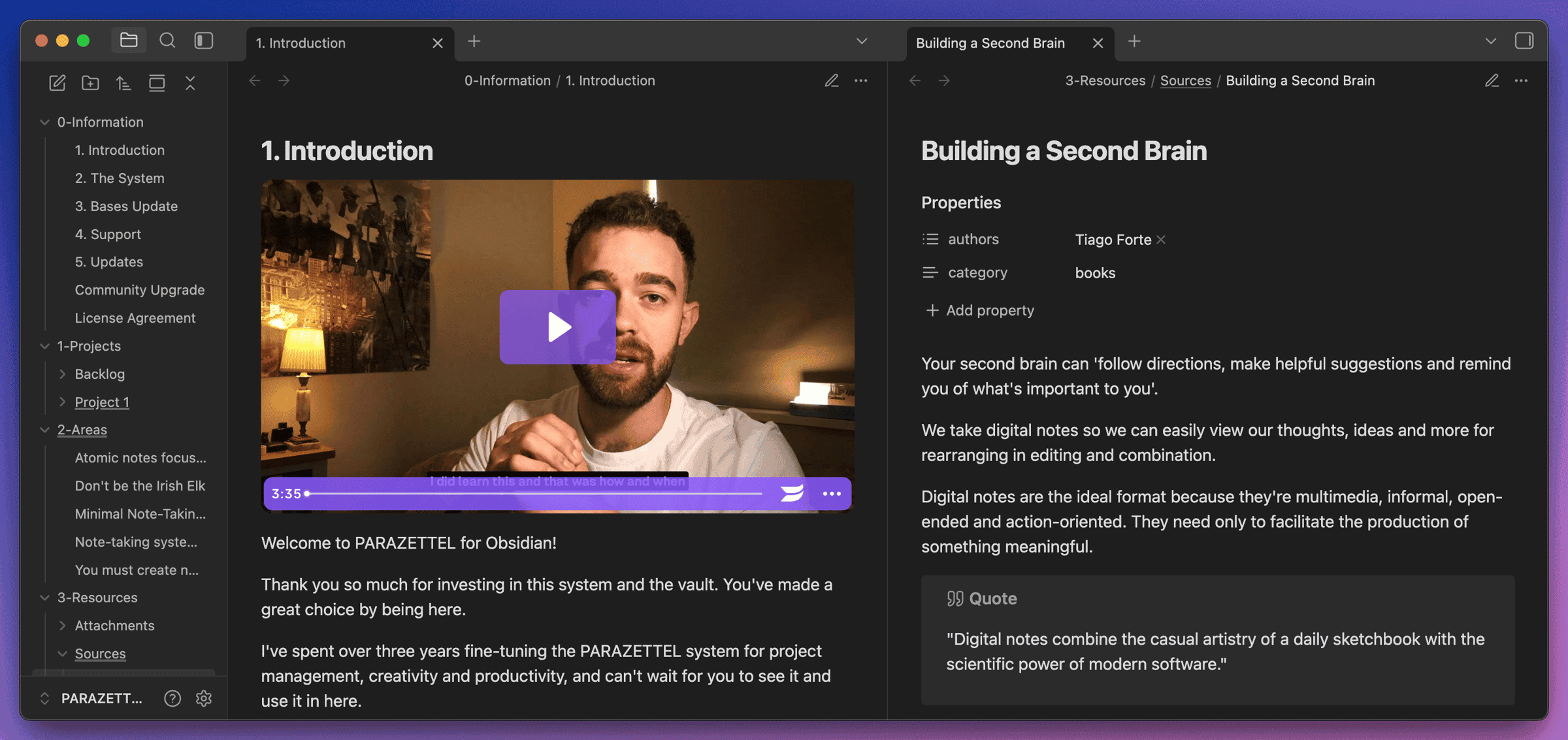
Most people use Obsidian just for taking notes. Inspired by the app’s CEO, I’ve been managing my websites using the app for over a year now. I first deployed AI to build the old fundamentalised.com back in January 2025, and since then I’ve never looked back.
Alongside Claude Code, this has become even more powerful more recently, and so today I wanted to talk about how I made the switch, and why I find this better than doing so through a ‘website builder’ per se.
We’ll touch on Claude Code a little later, but for now we’ll walk through the stack I use for all my websites (Obsidian + Hugo + Netlify) and how I migrated everything over from Medium and Carrd (parazettel.com-specific).
The stack in plain English
At a high level, everything is just markdown files in an Obsidian vault that get turned into a website by Hugo and deployed by Netlify, with GitHub in the middle to glue it together.
Obsidian is where I write and edit all the .md files. Hugo reads those files, applies the PaperMod theme, and turns them into fast, static HTML pages. The vault itself is a Git repo on GitHub, and Netlify watches that repo.
Every time I push, Netlify runs Hugo, builds the site, and deploys the new version. Claude Code sits on top of this to help refactor templates, migrate content, and keep the vault tidy with skills like /proofread and /cta (which I discuss a little later).
Origin of the new websites
Right at the start of PARAZETTEL, I was convinced that I needed to use Webflow to build a full-fledged website to generate sales.
However, Webflow was completely overpowered for everything that I had in mind, so I moved to Carrd very quickly after this. It’s a simple, one-page site editor, great for building simple landing pages for products.
We developed many iterations of the PARAZETTEL landing page on this platform, and it served me well for 2.5 years, before I decided to rebuild things with Claude.
As inspiration, I’d found the information about markdown plain text inside Obsidian to make websites from the CEO Steph Ango (@kepano), who had written about this on Twitter…
a quick demo of how I edit my website with Obsidian 1.8
— kepano (@kepano) December 19, 2024
write in @obsdmd → auto-build jekyll → preview local site in web viewer tab → push to github → auto-deploy to live site
I've been making websites for twenty five years, and this is by far the nicest it's ever been pic.twitter.com/Dlw7Iorxop
For a long time prior to this I’d known about this, without the expertise to implement it…
But with this inspiration and with AI improving, I downloaded Cursor with a free plan and wasted no time in building a website for Fundamentalised.
Steph uses Jekyll as the HTML generator, and I use Hugo, but both are ideal, because Obsidian is based upon markdown as well, so I could edit the files inside of Obsidian, commit them to a Git repository hosted on Github, and have Netlify (my web hosting solution) automatically build and push the website to be live.
So this is what I did. With the help of the PaperMod template for Hugo, just so that I didn’t have much overhead in terms of implementing visual design, I put together the old Fundamentalised.com to show my newsletter issues, rather than running them on Substack.
For a long time I just ran the Fundamentalised website like this while I was still at university and still writing the newsletter.
But later that year, after I’d started travelling, I discontinued Fundamentalised and put all my personal writing on my personal website, tstowx.com.
After the success of this, I decided to take the leap and transition away from using a simple one-page site builder for the PARAZETTEL website too.
The reasons?
- The custom stack is free - build using AI (not completely free, but close enough), push to Github and host on the internet using Netlify.
- It’s customisable - with Substack (for the newsletter), and Carrd (for the business), I could only ever add simple features. With custom builds, I could make improvements to my heart’s content.
- No admin panel - everything’s very direct. I don’t have to log into Webflow, Carrd, Squarespace or WordPress. I can make local changes on my machine, preview things and shoot them to production with a simple prompt.
So how are things looking across my sites now?
The custom websites now
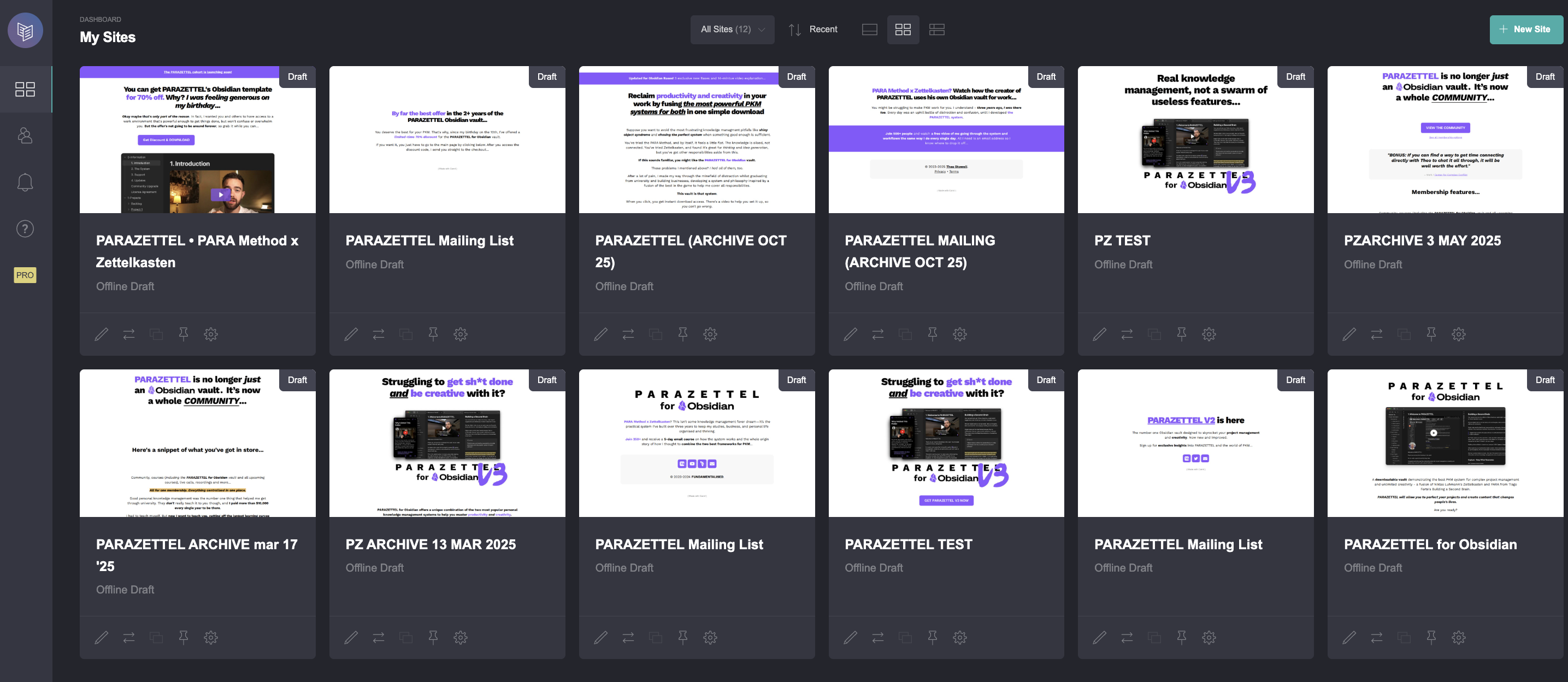
Back in October last year, I was in Da Nang, like I am at the time of writing this piece, and I was looking at my personal, photography and Fundamentalised websites.
Considering these, as well as the landing pages for the PARAZETTEL business, I realised that we needed to refactor things. The personal work was disjointed, and integrated into the business in the wrong way.
So, as I explained above I built the new https://tstowx.com, to house all of my personal writing and photography.
It was going to be more difficult to build a full-fledged PARAZETTEL site, because there are more moving pieces, like articles and products, as well as custom visual elements.
But I’d bought a Claude Pro subscription, instead of Cursor on a Free plan, and was learning how to use it in the terminal by building the simpler website.
It was time to take the leap.
The first part was pretty easy - simply clone the Fundamentalised site and its design, so that I was starting from something that I already knew worked.
And then it became a bit trickier…
The hardest part of the process was migrating all my articles over from Medium so that they could be stored on the website as well. Images, links, the right metadata, the lot.
I went about this by exporting all of my Medium data, and then painstakingly explaining to Claude how they were formatted, and how I wanted them processed onto my website.
And then I exhausted my Claude Code limit many times to get it to read all of these pieces and add + format them inside my website’s new Obsidian vault.
Back at the start of November though, it was time to launch.
Since then, it’s been growing, slowly but surely, as Google catches on, and becomes one of my largest sources of organic traffic without having to lift a finger…
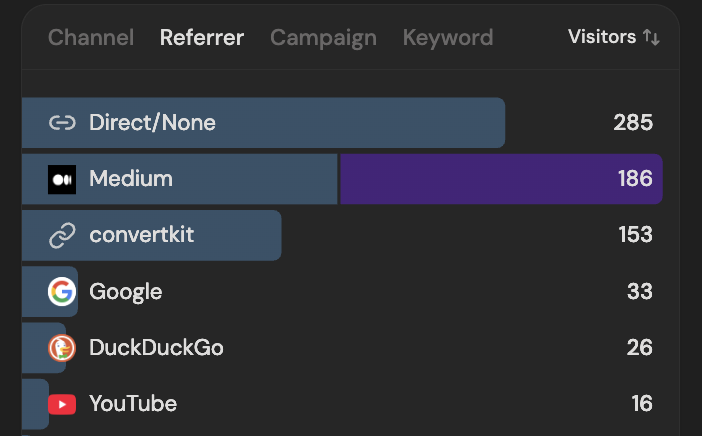
The visitors above are in the last 30 days, so you can see how much articles mean to the business, as opposed to videos (the growing of which are a work in progress).
Realising this, I thought a few nifty ways to tie AI even further into the development and creative processes…
Supercharging this with my newest Claude Code advancements…
To start with, I just used Claude to build infrastructure and design changes for the site. Things like the new hero, embedding convertkit forms, a custom footer that linked to everything relevant.
Claude Code now plays an even more active part in maintaining my website than it did before, just making visual and technical changes.
Skills, which are claude code’s version of prompts for certain things, so that you don’t have to write the same text into the entry bar again and again.
There are a couple of skills that I use regularly now…
/proofread - this skill has access to my website Obsidian vault ‘parazettel.com’, and can read the articles that I’ve published, as well as the drafts, which is the format this piece is in as I write right now.
What the skill does is check the piece for outright grammatical errors and solves these automatically, in British English.
But my articles are a little more dynamic than this - I want in-text links, as well as references to other articles, almost building a web of context between them.
Because this skill has access to my entire repository of articles, it reads them and inserts links across to them when relevant connections are found.
I can also explain in plain English what I want to be put in - so for above, where you saw the card linking to another article, I just put the following…
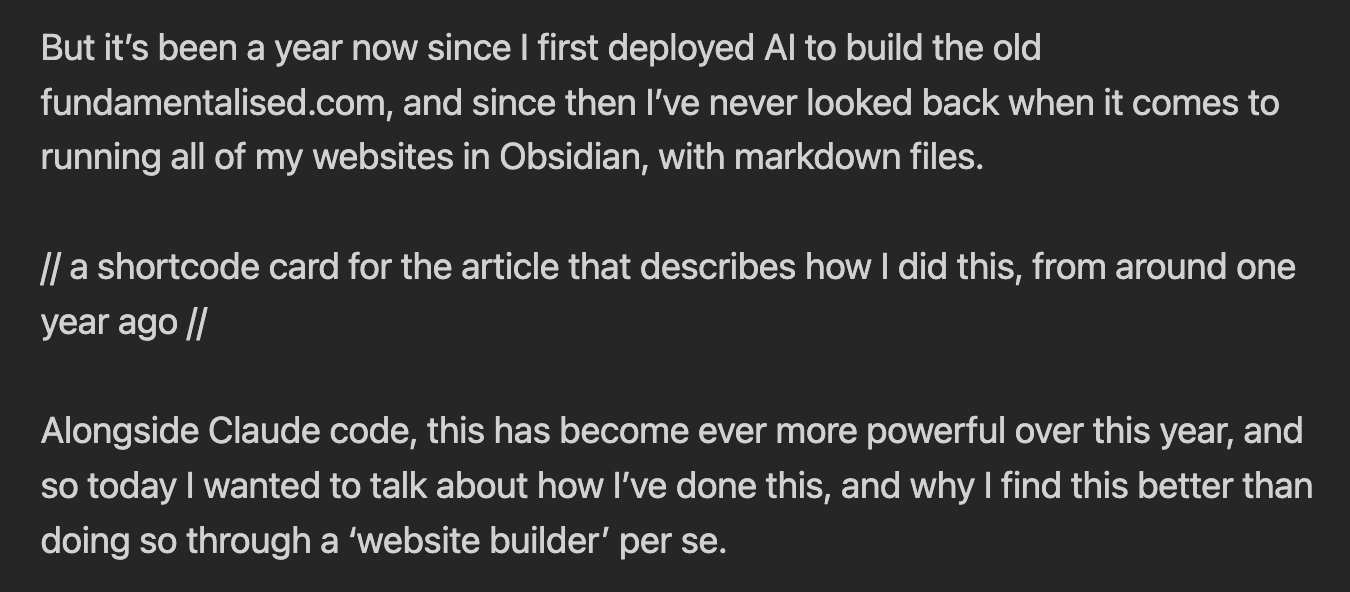
It’s very powerful, and again makes my workflow purer - now all I have to do is write, and describe what I want.
- /cta - This command is simpler and builds customised lists of CTAs built on what it thinks the most relevant course for the user might be, as well as adding simpler links to the community and the newsletter.
Claude takes care of much of the work an assistant might do, for a fraction of the cost, and it’s instant. Your skills are almost like SOPs (standard operating procedures) that you might give to an assistant to tell them how to complete your backlog of tasks.
It beats a 3rd party CRM because it removes steps and complexity from the workflow (which is the entire point when you use Minimal Note-Taking). You don’t want to have to push to WordPress and then share it to the site
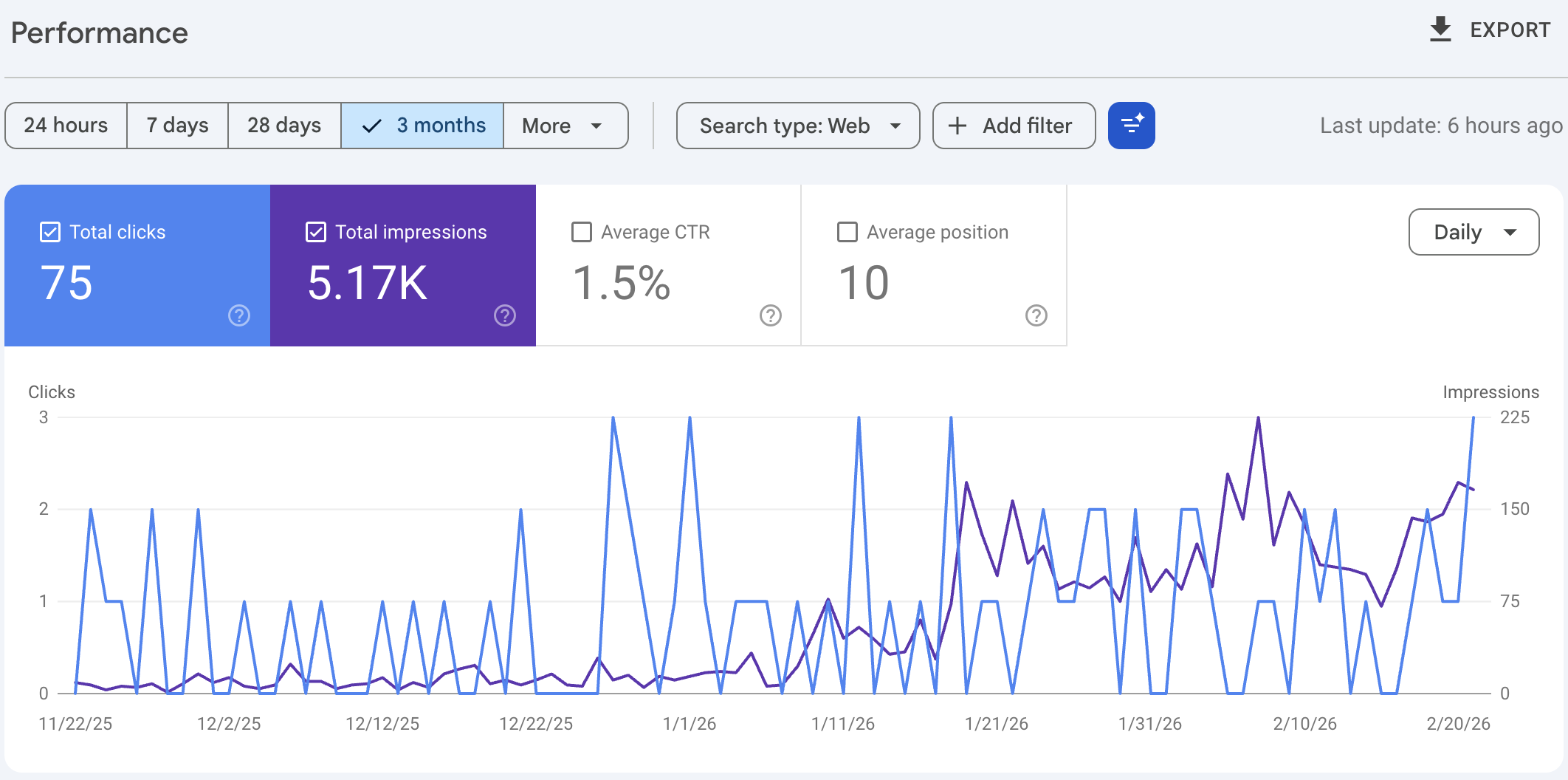
And the SEO scores are pretty damn good. PARAZETTEL.com’s impressions are increasing slowly over time, and as I make some more architecture changes with Claude code, like adding TOCs and tags that allow people to search by a certain topic and choose the articles they want to see.
Tradeoffs
Of course, like anything, there are some difficulties with doing this. You need Claude Code, Cursor, or some other platform that you use for integrating AI into your coding projects.
There’s no way to drag and drop, and the process of making visual changes can be quite iterative (i.e. takes a few goes) before you get it right, in comparison to making changes with a visual, drag-and-drop editor.
You also need to be prepared to burn through a few million AI usage tokens, like I struggled with during the process intensive migration of all Medium articles.
However, once you’re set up and have a good baseline to work from, this is perfect and we’re ready to go.
There are simpler solutions, Obsidian Sync for one, that allow you to simply click publish on your notes, but when you want something a little more advanced, this is the most effective and streamlined method that I’ve found as of right now.
So overall, especially if you’re using Obsidian already and have a personal website, you should consider doing a local markdown directory and turning it into a website that you can manage with Obsidian.
It’s just files on your machine. You can edit them in the way that you’re used to, and begin publishing to the internet tomorrow.
Thanks for reading - if you’ve tried this before, let me know how it’s worked out for you!
If you found this useful, the PARAZETTEL Community is where I go deeper — drop in and say hello.
If you want to take things further, the Claude Code x Obsidian Course covers this in full.
And if you’re not on the newsletter yet, the PZTL letter goes out every Sunday — one email, worth reading.