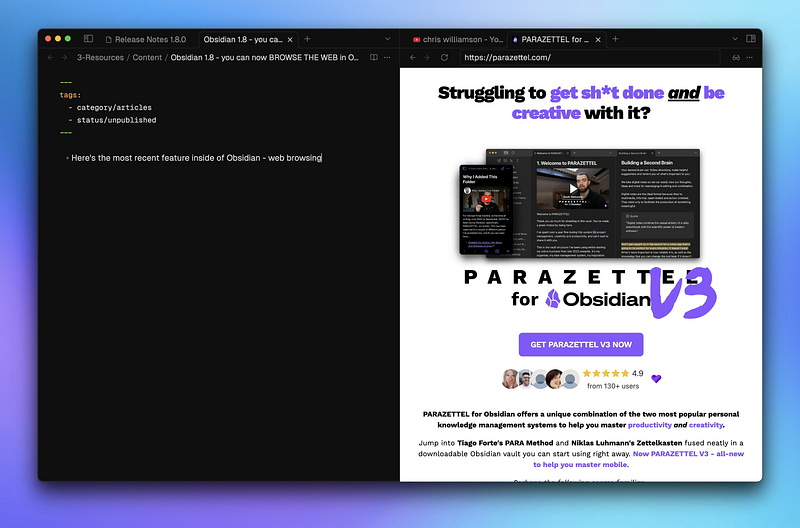
Yesterday I was scrolling through Twitter when I came across a post from Obsidian revealing its 1.8 update.
Now I’ve been expecting a few things from Obsidian’s upcoming improvements, like a new interface from data (I’m imagining Dataview but in core plugin form) as well as mobile quick capture capabilities.
Web browsing I was not expecting. But here we are. I’ve already created a video walking through everything I’ve discovered about the core plugin ‘Web viewer’ since its release.
But if you’re someone who prefers to read, this article is here too. I’ll cover why I think this update is actually useful rather than gimmicky, what I have started to use it for and what I’d like to see from this feature in the future.
Let’s get started…
Note — as of right now, this update’s only available to Insiders, so you need an Obsidian Catalyst license to use this feature. I’m sure it won’t be long before its made public though.
Web viewer feature overview
Right now, the Web viewer core plugin is relatively simple. Its main function is to open web pages in the app, the same way you’d open a new tab to write a note.
There are commands to ‘Search the web’, opening a search bar in which you can type a query, and ‘Open web viewer’, which opens a tab to a web page that you specify in the plugin settings.
Also inside these settings, you can also specify which search engine to use for your browsing, configure add blocking, and choose whether you open your vault’s external links in your default browser or inside Obsidian itself.
For this last setting, I’ve chosen to open my links in Obsidian and have begun to put together a rudimentary Start Page — somewhere I can head and have access to all of my most-used sites and web apps in a single place.
It’s pretty basic at the moment but I’m sure to upgrade and improve it as I start to use this feature more and more. There’ll be another article walking through it when I do, so keep an eye out.
One more feature that the Web viewer has already is similar to the official Obsidian Web Clipper browser extension I wrote about a couple of months ago — you can turn on a ‘reader mode’ which parses the web page into a neat native-looking format which integrates perfectly into Obsidian’s visual theming.
And with another click of a button, you can add your web pages to a certain folder in your vault in this form, completely parsed and saved as markdown.
This means you can save links natively as notes in your vault and work with them offline and personalised — you can edit, update and annotate these articles as much as you want, adding your own spin on your captured web content.
This fact brings me nicely to what I believe the biggest advantage of this new feature is…
The biggest advantage of Web viewer
In short — reduced context switching.
When you use Obsidian plus a whole open browser (as I normally do to write and share work), there’s a lot more opportunity to click away into a website that’s distracting you.
I’m not sure what it’s like for others but if I’m in the browser, all I’ve got to do is click ‘X and then ENTER’ in the search bar and I’m on Twitter.
Now that I can work inside of a Web viewer tab in Obsidian, there’s more friction to doing this, meaning I’m less attracted to the option to distract myself. There will be things that I learn to do in Obsidian’s web viewer rather than in a browser because of the peace that will come from operating there.
Right now I can only make suggestions but as I said, I’ll be sure to write a new article a couple of months from now to get you up to speed with how my use of the Web viewer has evolved.
Limitations and what to watch out for
When I mentioned web clipping above, I didn’t mention that as far as I can see, right now, there is no way to capture the metadata of the web page that you want to save in the same way that the official web clipper can do.
Now I don’t know whether there’s any limitations or bottlenecks to coding this within the in-app web viewer because I’m not any good at coding like that but in my head, it seems logical.
And I know that it’s very early in its life to be making requests of a feature, but I’m tempted to say I’d want web extension ability for Obsidian as well. I’d love to have access to Unhook for YouTube, Simplify for Gmail and Minimal Theme for Twitter inside of Obsidian because all of these extensions serve great function to make their respective websites less distracting in a normal browser.
Right now, YouTube’s a mess of recommended videos, comments and other visual clutter whenever I open it in Obsidian, so I’ll be sticking to Arc for most of my digital content consumption.
But for a few things, like writing email broadcasts and reading articles in Readwise Reader, this new feature’s great. I’m based within one app for drafting, writing and sharing. It’s streamlined and simple, and I couldn’t be happier with web viewer from this perspective.
I’ve always promoted minimal note-taking anyway — doing the least possible work in the simplest system to achieve the desired output.
Perhaps I don’t need web extensions. Perhaps this idea was born out of the distracted side of my brain talking.
Either way, that’s my roundup of Obsidian 1.8’s standout new feature. I hope you’ve learned something and are getting to grips with or looking forward to having this feature in your own vault.
Thanks for reading!