Last Wednesday, I submitted my final piece of coursework for my university course. Now, although I’ve got three exams still to go, this marks passing the last submission to turn in before I graduate. That’s it. This is a strange feeling really — the end of an era.
And if you know a little about my story, and how I chose Obsidian to manage all my work before I went out to university, then you know that I’ve been studying as one of my priorities for the entire time I’ve been using the app.
In this piece, I’ll share the plugins that I used for the job from the first year in 2022, to where we are now. I’ve been using them mostly for writing, but there are some other hidden gems in there for people who study.
Let’s get started…
Writing Reports and Reviews
The course that I studied was zoology, a subject where every submission you write has to be packed full of relevant peer-reviewed research.
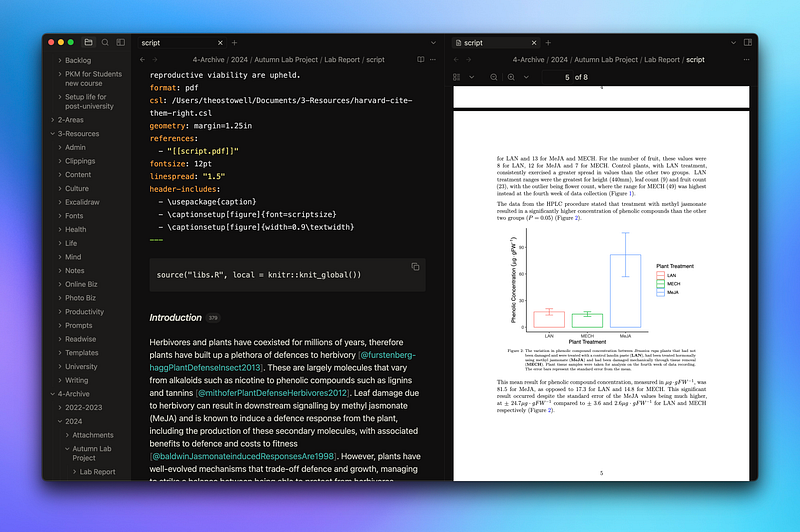
Right from the start, I started to put together a framework for doing this consistently in Obsidian — doing everything inside markdown or Quarto markdown files, with a handful plugins to help me…
Citations
This plugin requires that you use a reference manager. The one that I chose for the whole of uni is called Zotero, and in Zotero you need a plugin called Better BibTeX that exports your library into a file stored on your computer that the Citations plugin can select from.
When you use the Citations plugin, you get a citekey referring to that citation in the BibTeX file, which gets rendered into an in-text citation and an entry in the list of references when you render your base markdown file into a PDF.
You can find what’s called the Citation Style Language (CSL) file online for the format of citations that your university requires you to use, and once you’ve done that and set it in the metadata of the markdown script, you don’t have to do anything else. Everything gets added and formatted automatically — very useful.
qmd as md
Here’s a little plugin that I used to open my .qmd files in my Obsidian vault. I used to do a lot of stats analyses in RStudio, so I like to knit together my files from RStudio to make graphs.
This required using Quarto files rather than simply markdown and by default, Obsidian doesn’t view .qmd files.
Luckily, this plugin exists, and so it was an easy fix that I never had any problems with. Just get this booted up, and you can open .qmd files in your vault and edit them just the same.
LaTeX Suite
When I’m writing reports, sometimes I need to render more complicated formulae or other scientific text on the page. Because the PDF that I publish uses LaTeX markup language, I’m able to do this pretty easily.
But there’s a neat little plugin called LaTeX Suite that makes things even easier — it allows me to bind keys to actions to help write LaTeX quickly such as ‘mk’ being replaced by ‘$…$’ ready to insert more symbols and markup.
Shell Commands
All this plugin does is run terminal commands from any point in your vault. Once I had used qmd as md and Citations to finish writing my reports, I had two options. I could either open up another app (RStudio) and then knit the PDF from there, or I could add a command into the Shell commands plugin and do things entirely inside Obsidian.
Other Uni Tasks
Whilst writing reports and other longer work submissions were my main tasks and priorities whilst using Obsidian at university, there were other things that I used it for in patches as well. Here are the other plugins that helped with these things…
Export to Anki
This was one of my favourite plugins back when I was doing module revision for exams through spaced repetition (one of the best methods for learning content).
It made it very easy to transform my lecture notes and export them into flashcards perfect for learning from in one streamlined process, rather than having to faff about with a number of different apps at once.
Although I don’t use Anki anymore for revision (I just make the notes and spaced-repeat the information without the software now), it’s still a great tool, and this is how I made use of it when I was managing my spaced-repetition revision before exams.
Outliner
I’ve been taking many notes in lectures and other meetings at university, so I’ve needed a good way to do this that’s comfortable and sustainable.
The best way that I’ve found is through outlining things — a list of bullet points. So I’ve been using the Outliner plugin pretty much since I started using Obsidian (I use outlines for drafting these articles as well).
It adds a number of small features to the outlining capability that Obsidian already has, such as sticking the cursor to bullet points, and adding drag-and-drop so that you can move your ideas around easily inside of the outline itself.
You might have noticed that primary theme linking these plugins together is that they simply make my life easier. They’re not trying to do anything revolutionary, like AI-managing-ideas-outlining-etc., they’re just there to make things smoother in my general work, meaning that I’m more inclined to actually get things done, because essential tasks are simpler and more automated.
This is very valuable, because the more you enjoy doing something, the more likely you are to win. Take writing, for example — when you enjoy writing, you’re going to do it with more intensity, more often, meaning you’re very likely to write better than others who only do so for external incentives.
So try and design your working environment and purpose to be as simple and enjoyable as possible when getting on with your daily tasks, and watch how your productivity and enjoyment both go through the roof.