
There are some Obsidian plugins that I’ve fallen out of love with over time (think Kanban and Excalidraw) — although there’s nothing that I’ve got against these plugins, they’ve just not stuck around.
However, there are some plugins that I’ve had installed in my Obsidian vault for a very long time, with some even as long as I’ve had the app as my main solution for note-taking and personal knowledge management.
In this article, it’s these plugins that I’m going to share. I hope that they provide some insight into how I’ve managed and worked in my vault over the last two years across all domains, from online writing to studying.
Let’s get started…
Dataview + Folder notes
These two plugins are the most pivotal in my entire vault. The idea of project notes and tasks relies on them heavily, and they’re how I’ve created indexes to cover all the content in certain folders in my vault.
I’m going to show a picture here of an example, then I’m going to explain how it works…
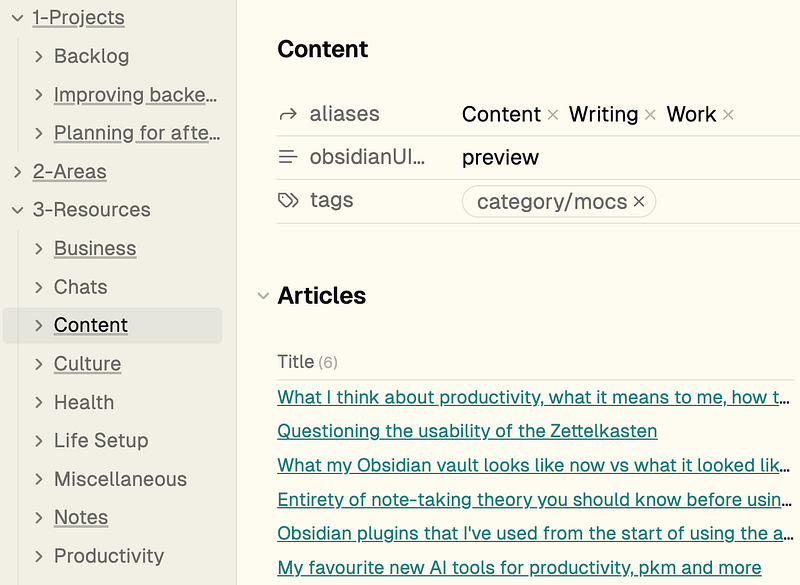
What the plugin folder notes does is create a note in the chosen folder that can be opened by clicking on the folder in the sidebar. The note isn’t shown when you expand the folder, and it’s named the same thing as the folder itself.
This gives you a simple interface to view your files in a single note in Obsidian.
Coupled with Dataview this is really powerful because of the creation of indexes. I use this code here…
TABLE
FROM -#category/mocs
WHERE contains(file.folder, this.file.folder)
What this query does is grab all the notes inside the chosen folder and display them in the table without showing the folder note itself (hence excluding the mocs category tag).
From here you’ve got a note that displays the entire folder’s notes in a list that you can navigate to and from very easily. Pressing the new note shortcut lets you add a new note in the chosen folder nice and quickly and you can also add short bullets and ideas that relate to the general topic of the folder itself in the folder note for even more convenient access.
I used to manage tasks to do with certain projects and areas inside my vault structure but since have moved to pen and paper for task management because of how nicely it slows down my thoughts. This doesn’t mean you can’t manage tasks here really well too.
My strategy was to use the Todoist plugin that could create lists of tasks in my vault that were mirrored to corresponding Todoist projects.
This meant I could see inside Obsidian the tasks that I had to do, and then tick them off in the vault and have the changes mirrored to Todoist. It was an amazing and streamlined workflow.
Outliner
This is another long-serving plugin in my vault. it doesn’t play as pivotal a role as Dataview and Folder notes, but it’s still important.
You see, before I write every single long-form piece of work, I plan out it’s structure and contents in bullet format.
All this plugin does is add a few more features compared to the default outlining in obsidian. However, a couple of useful extra features are important when so much of your work relies on this specific format of writing.
Readwise Official
This plugin is one of my favourites…
It allows you to import your entire readwise library into Obsidian. This is great when you’re consuming a lot of content and trying to get inspiration for creating from it as well.
I’ve already written a lot about how I use Readwise and its Obsidian plugin in my work, but I’ll give you the low down here…
You can capture information in many different ways, from articles to Kindle books and podcasts and Readwise (along with its plugin) makes sure everything is aggregated and added into Obsidian.
Basic resource metadata is added too and one of my favourite features is that you can customise its format and also how the highlights appear by default in your notes. So I remove all the pointless data they add normally, like ‘highlight colour’ and ’number of highlights’ and just build a nice, plain searchable note that I can check for interesting content in my own time and comfort.
Templater
Templater and the following plugin QuickAdd are quite similar to each other…
I wrote about both when I was going over the best Obsidian plugins for power users and they’ve stayed in my arsenal for a long time now.
Templater is a plugin that references a designated folder of notes in your vault and uses them as templates to insert given information into your other notes.
I use this plugin to add a template to every note I create (because every note has some kind of templated metadata attached to it, automated pretty much entirely through this plugin and QuickAdd).
You can also use the internal functions in the plugin to automate the addition of variables in your content templates. Think dates, file metadata and even web content.
This is extremely useful so you don’t have to keep updating the template when a variable changes. It’s something that I use during the addition of notes in my inbox…
Every note in the inbox is treated the same, with the title as an arbitrary time stamp at the point it’s added. when I process the inbox, I use Templater to assign type and metadata to each of the notes in there, which greatly speeds up the process of clarifying and moving notes.
QuickAdd
The last plugin on this list was one that I was a huge fan of a year or so ago…
I’ve reduced its role in my vault to a few core functions but this doesn’t mean it’s a useless addition. It’s stayed around for the full two years I’ve been using Obsidian, after all.
QuickAdd started as a modified version of the above Templater plugin, but over time grew into its own offering entirely.
What it allows you to do is quite self-explanatory — it’s a suite of tools that allows you to capture certain content to your notes quickly and easily.
This can be inserting templates in the same way that templater does above, or it can be quickly capturing information such as article titles and then adding new notes with necessary metadata into the content folder of your vault.
You can also integrate QuickAdd with an OpenAI API key and some other LLMs too — I’ve not used this feature for a while, but I used to and this was how my writing started to gain a little traction around obsidian use and personal knowledge management.
I imagine the AI features of this plugin have only grown in functionality, seeing as AI is getting more powerful and I might look into using them in the future. Right now I’m practicing what I preach in terms of keeping my system as bloat-free as possible so I don’t use these AI features at all.
So that sums up the plugins I’ve used for the longest in my Obsidian vault. Like I said, some come and go, but these have been stalwarts in my setup from the start, whether I’ve been using PARAZETTEL or something more primitive.
I hope that you’ve learned something from reading this piece and perhaps now have a new plugin to try out. Thanks for reading!