About a month ago, before I went on a writing sabbatical during university exam season, I installed Obsidian on my phone and purchased their Sync service for the first time.
Just before that, I’d deleted Todoist because of task overflow, and I was looking for a simpler way to quickly capture content on mobile so that I wouldn’t lose the ideas that come to me during the day.
Obsidian hadn’t crossed my mind as a solution in the past, but I’d become aware of a Mac/iOS shortcut that would create the functionality I was looking for. So I installed the mobile app and purchased Obsidian Sync.
One month on, I thought I’d write this piece to share my opinions on the service, as well as how I use Obsidian on mobile…
The vault that I use on mobile is synced to my vault on my MacBook. This means that I use the PARAZETTEL vault structure on mobile exactly as I do on a laptop, so I had to find a method of creating quick notes and inserting them into the inbox natively on an iPhone.
After slightly editing the iOS shortcut to match my personal use case, this is what I ended up with…
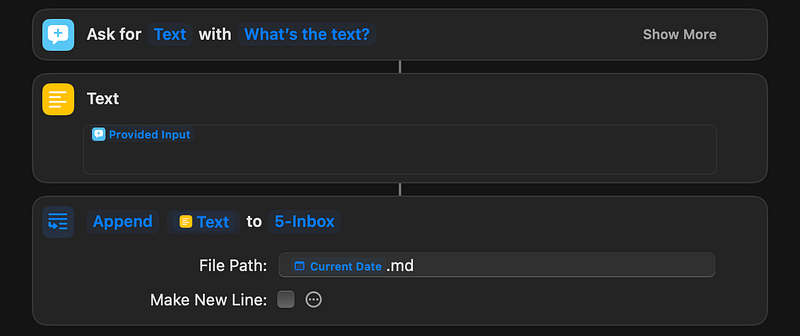
Over testing I’ve triggered this shortcut in a few different ways:
- Using a widget on the home screen — I’m not too fond of widgets so this method didn’t last long
- Triple tapping the back of my device — iPhones have an accessibility feature in which tapping the back triggers any accessibility setting, including shortcuts. Unfortunately, the response on my phone is unreliable, so I don’t use this method either
- Using a lock screen widget — my preferred option — I used the same method back when Todoist was my quick capture method of choice. It’s natural to me and very quick to launch
Once active, this shortcut opens up a native insert box in which you can type to your heart’s content.
Then, once finished, the text of your note is delivered to a location you specify in the shortcut settings above.
I name any note that I save to my inbox according to the date and time which it was captured, ‘20240605145659’ for example, so the notes are listed in order of when they were captured, containing a small but fully automated extra snippet of context about the note.
Because I save everything that I capture to a single inbox, I can process the notes simply when I’m on my laptop. Obsidian Sync ensures the notes I take on mobile are mirrored to my desktop vault and vice versa.
That’s all I use Obsidian’s mobile app for right now. I like to keep things simple, and my Macbook is nice and portable so I do most of my work on a desktop, where I have full functionality.
My style of work is always based around simplicity — I aim for as little friction as possible so I only use mobile for the things that are the most suited to mobile usage i.e. quick capturing notes on the fly.
Aside from this, I’ve taken a few longer-form notes inside the app when my laptop is not with me (a decent experience but not one to write home about), but nothing else in a consistent manner similar to quick notes. I’ll share another update in the future if this changes.
Thanks for reading!