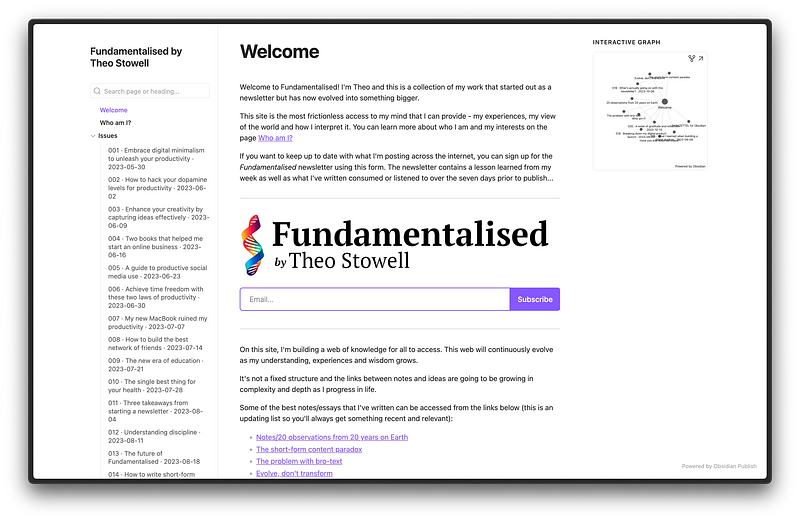
Update — I no longer maintain this website because I’ve created something more complex and powerful for Fundamentalised. This doesn’t stop Obsidian Publish from being a great place to start sharing your work.
It’s good to have a personal website. A corner of the internet that’s yours, that nobody can take away from you.
They’re not only reserved for bloggers or professionals — it can be cheap and easy to set up a website for yourself.
That’s what I’ve been doing of late. Tired of having my work spread out across many social media platforms, I looked for a solution to collect my writing in a single place for the first time.
The solution I eventually came up with might not be what you think.
In this piece I’m going to go over the services and tools that I tried, why I settled on Obsidian and the other auxiliary tools I use to run the site.
Here’s the story…
I began this project looking at the more common text-based site solutions — static site generators like Jekyll and Hugo.
I liked the style of sites like the blogs of Seth Godin and Stephan Ango, the latter of which I knew used Jekyll.
However, my technical skills aren’t superb and I didn’t want the time overhead of maintaining the site and fixing technical issues that might arise while building.
This caused me to move on to trialling hosting a site on Hostinger and building using WordPress. The most popular site-building solution in the world, surely WordPress was going to be the solution to my search…
Not quite.
Many of the premium WordPress theme options were paid, and I already had to fork out a considerable amount of money to Hostinger to get the site online.
This wasn’t to mention the confusing host of plugins and the cumbersome theme design editor the platform provided by default.
WordPress + Hostinger wasn’t going to cut it as a solution.
I stopped searching here for a while. I’d tried most of the options that I thought existed for building a content-based site.
Or so I’d thought.
But I’d forgotten that the app that I use to take all my notes and write all my work, Obsidian, has a solution for publishing notes on the internet.
Following a similar linked-thinking, file-and-folder setup that an offline Obsidian vault would, creating a site in using Obsidian Publish seemed like a natural extension of the knowledge management skills I’d built in Obsidian over the last year and a half.
There was nothing to lose. Using my Obsidian Student Discount, I paid for the service and published a few notes on my new site.
The first impressions were promising. I liked how I could manage all the content offline in my desktop Obsidian seamlessly, and choose to publish to the web when I was ready.
With a few design and layout tweaks, I decided to commit.
Spending hours adding the best of my content, I set up a bare-bones site Fundamentalised, integrated with my beehiiv newsletter.
Having used beehiiv since my first-ever email broadcast back at the end of May this year, I was hesitant to take my newsletter list elsewhere. Luckily, there was a solution that was going to allow me to continue gaining email subscribers through the new website.
Within beehiiv’s settings, I created a themed signup form and plastered the iframe code across the front of Fundamentalised.
Now those interested could sign up from my website and the beehiiv newsletter signup page.
From there, the site was ready so I started sharing its content across the rest of the internet to drive some traffic.
As I continued to grow Fundamentalised, the benefits of launching the site using Obsidian Publish became more apparent:
- I could still use my custom domain fundamentalised.com, set up using Cloudflare to manage everything to do with the domain
- Very shallow learning curve because of the prior experience of using Obsidian
- It’s very cheap — with my student discount, the site only costs £5.10/m to run, with a yearly transaction of £10 for the domain
- Simple — there’s little chance for customisation unless you’re comfortable using CSS (I’m not), so the focus is on writing engaging content
If you use Obsidian to write notes and create content, check out Obsidian Publish as a means of launching a website if you don’t have one already.
Thanks for reading!