From around last August to January last year, I was working on launching and then relaunching my first digital product PARAZETTEL.
It’s all about a system for knowledge management in Obsidian and in fashion, I managed the whole project using the system itself.
Out of all the projects I’ve worked on, this one was by far the largest and longest-lasting, so I thought I’d share some insight on managing big projects that you might have yourself.
First, I’ll explain how I set up my vault and where this project was located inside of it…
Project Setup and Structure
PARAZETTEL takes inspiration from Tiago Forte’s PARA Method, which splits the vault into four sections, one being ‘Projects’.
Any work that has to do with achieving a set outcome at some point in the future (i.e. a project) goes into a related project folder. Therefore, I had a project folder for every PARAZETTEL-related note that I was going to make, called ‘Create an Obsidian product’.
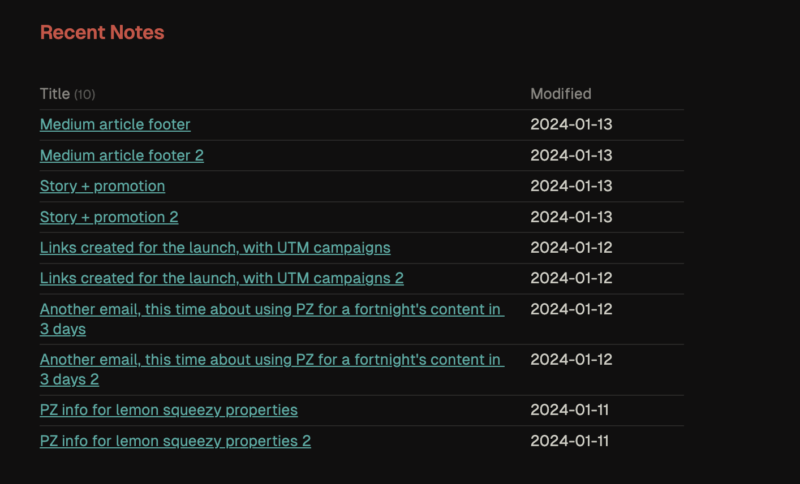
Because I use the Folder notes plugin, I had a folder note available to me when I clicked on the folder in the sidebar. I used this folder note as an index and created a Dataview table that rendered every note in the folder for a quick overview of the whole project.

This picture above shows just a snippet of what the folder note for the project looked like once I’d finished the second launch in January. The index of files had become so large at this point I’d decided to limit it to the 10 most recently modified files. For much of the project though, every note was visible in the index.
As well as being a good place to list contents for the project, this was somewhere I wrote down general notes that didn’t deserve their own file.
The folder note was where I also stored the few tasks that I would record to keep myself on track on the project…
Task Management
The reason I didn’t use a complex task management system for this project was because I didn’t feel the need for one. If there was something that I needed to do for the project I either executed the task in the moment or captured it on the folder note.
Instead of tying myself down by having a list of non-negotiable tasks, I created lists on paper at the start of each day of the things that I wanted to achieve, repeating this over and over until the project was done.
I’d shared the launch date to the email list too, both times, so there was an element of external accountability that I was experiencing — because of this, I didn’t have time to go overboard with task management, instead opting to get the more important parts of the project sorted first. I kept things as simple as I could to make sure I was actually going to be able to do the important work…
Minimal Note-Taking
This method of working with projects aligns well with Minimal Note-Taking — enough functionality to allow you to work without limits, but simple enough that you don’t get hung up on how you should be managing your notes.
I was able to focus on creating notes, writing course outlines, recording, demonstrating and everything else that I needed to do leading up to release rather than managing how I managed my knowledge.
That is the fundamental principle that guides how I teach knowledge management — if things don’t become simple enough for your work and organisation structure to be second nature then there’s still some work to do. You can cut back on a lot more bloated system than you think you can. It helps as well if you have a project to work towards that you feel very purposeful about. It helps you actually do the work rather than procrastinating by fiddling with your knowledge management system.
Anyway, I gave a workshop a while ago about how I use Obsidian to create content that I share on the internet. Within it, I demonstrated this kind of project management and later received a lot of requests to dive into it in more detail. So I’m going to be hosting another free workshop soon, this time about how I work on projects.
It’s going to cover what I shared here, but in more detail, with visual demonstrations for you to follow and learn from.
Thanks for reading!