Capturing content from your world is the first step to generating new ideas in your knowledge management system, whether they come from your mind, from articles, books or anything else.
In this piece, I’m going to cover every single tool and configuration that I use for this.
We’ll start with by far the most important…
Inbox — internal ideas and thoughts
This is the most important of all sources of inspiration in the world.
It’s easy to think that all your ideas will come from internet content and you’ll be able to remember them for when you need to use them later, but this isn’t true.
Every single original thought or idea you’ve generated from your own perspective and experiences of the world is priceless in comparison to any clip of content from any piece of content you’ve consumed
They’re your only currency in the world when it comes to original work, so treat them with according care.
I do this in my Obsidian system through having a simple QuickAdd shortcut that creates a new note inside a folder I call ‘Inbox’. It opens a blank note that I can dump anything into. This is all. I can organise things later, and refine them later. The most important thing is to have a low-friction way of getting things from your mind to your knowledge system.
Before you even begin to think about the other methods of capturing content that I go over in the rest of this piece, make sure you’ve got a way of capturing things that come into your head that you find simple and frictionless to use. And capture everything…
One idea I like to keep in mind is to be very strict when capturing the ideas and content of others and absolutely liberal when it comes to capturing your thoughts. Capture as much as you can, because who knows where they’ll lead?
Once you’ve got this sorted though, you can move on to methods of capturing the rest of the internet…
How I do it — Readwise
Readwise is the core of my internet content-capturing workflow. If you haven’t heard it I’ll give a quick run-down here.
Readwise is where you can round up all your highlights/snippets/captures from all across a large selection of internet services. They offer to send you a periodic email reminding you of the highlights, prompting thought and perhaps a new idea or two, but the most useful feature in my opinion is being able to export the highlights to your note-taking app.
They’ve got options for this as well, from Notion to OneNote to some less popular solutions like Reflect and Heptabase. But the only integration I’m interested in is the one with Obsidian.
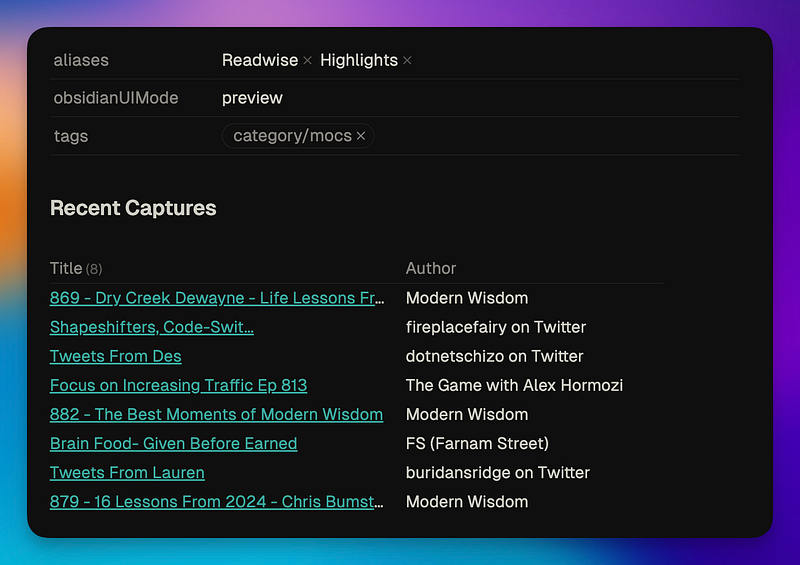
Through Readwise’s Official Obsidian plugin, I can capture the best parts of every piece of content that I consume across the internet. This is not saying that I capture a lot, rather I’ve got the facilities in place for simple and effective idea capturing if they come to me. This doesn’t matter whether I’m consuming articles, newsletters, or anything else. They all end up in Readwise and from there, Obsidian.
Here are the tools and methods I use for capturing each form of content…
(Note — Readwise is a paid service. It’s also fantastic and well worth the money it costs.)
Readwise Reader — Articles and newsletters
Paying for a full Readwise subscription grants access not only to their highlight aggregation tool but their newer read-it-later tool Readwise Reader as well. This has been the only tool I’ve considered for the last two years for my article-consuming, for a few reasons…
- It synchronises all the highlights you make into Readwise itself, without delay. You don’t have to worry about API keys or doing things manually, everything syncs automatically and you don’t have to worry about it.
- You get an email that you can use to sign up for all your newsletter subscriptions. This, alongside adding your RSS feeds, means that Readwise Reader gives you one spot to read all of your subscriptions without them cluttering up your main inbox.
- Reader also introduced a new feature of sending articles to Kindle recently. This is really useful for longer pieces.
Kindle — Books, longer articles and papers
I didn’t know how much I’d enjoy using a Kindle when I got one back in 2023, but it’s a great environment for reading, with so much less distraction than just using the mobile app.
Most of the new books I buy these days are Kindle books (although not all) and it’s much more convenient to carry just a small device rather than a number of books when I’m travelling.
You can connect your Kindle account to Readwise as well, and seamlessly synchronise all your highlights from every book you read into your notes in Obsidian.
So rather than opening your Kindle and navigating slowly to the notes of the specific book you want to look into, with Readwise you can just open your note in Obsidian and scroll through your highlights in the environment of ideation and knowledge management. Much more effective and keeps things firmly inside your PKM system.
Snipd — Podcasts
Snipd is the only service I’ve ever used for consuming podcasts aside from watching their videos on YouTube. And I’ve been using it since very early in its lifespan.
What’s special about Snipd compared to the others? In short, it’s the AI capabilities that help you snip a short transcript portion out of the podcast by tapping a button in the app whilst listening, or even just by pressing your earphones.
This means that you can have transcripts of your favourite parts of podcasts entered straight into Obsidian without you having to do anything manual. This is so useful for a format like podcasts, where it’s more difficult to sift through all the speech to find the point that you want to revisit when you’re coming up with new ideas you want to share.
Just remember to be very selective with what you save though, because it’s addictive to keep clicking the button and capturing all the ideas when you’re listening to someone you admire. Think about how you’re actually going to use the capture.
Twitter — Short essays, quotes and ideas
Readwise also integrates with Twitter, meaning that if you dare, you can venture into the algorithm to try and pull out the diamonds amongst the rough out there.
I’m rather opposed to mindless scrolling on social media though, so I don’t find myself using this feature as much, but it’s there if you come across something really good that you want to save.
And that completely rounds up how I capture any form of content I ever consume on the internet. Even if it’s not where I initially found the content, it ends up in one of these baskets where it can be consumed and processed into highlights in my Obsidian vault.
But be wary — there’s such a thing as consuming too much content. Remember what I said at the start, and focus on capturing the ideas from your head rather than highlighting things from the internet. They’re more valuable.
Thanks for reading!