
I’ve been at this for over two years now, here’s the most up-to-date stack…
In the past, quite a while ago, I used to write now and again about the different apps and services I was enjoying at that moment in time…

Apps Worth Paying For (IMHO)
Apps with the highest return on investment in my life...

Top Apps for PKM, Online Business and Writing in 2023
The apps, tools and services that have changed my life over the course of just a year...
But since then, I’ve learned a lot and have built up a newer and more effective philosophy around making purchases in this regard.
In this piece, we’ll go through everything that I use at the moment to run my online business PARAZETTEL…
****Once again, Obsidian makes the top of the list because of the central role that it plays in my business.
The app is where I teach people to work with their knowledge for more success in projects, personally and professionally.
And it’s completely free to use. Obsidian’s model of business is more sustainable than most and is built around an ethos of long-term growth and provision of a tool that people enjoy and want to use.
However, they’ve got licenses for bonuses, including early access and forum badges (completely separate from the function of the actual product).
I bought this licence, which is a one-time payment, right back at the start when I realised that the app was where I wanted to build my notes…

I Tried Tana, Anytype and Notion, Then Bought an Obsidian Catalyst Licence. Here's Why
Why Obsidian is the best notes app for building a functional, no-frills productivity system.
There’s also an optional add-on for Obsidian sync, which I bought to keep my notes in sync between my phone and my laptop.
There are workarounds, but as I’ll explain towards the end of this piece, I appreciate things that make my life easier, and I don’t mind paying for them if they seem reasonable.
Anyway, if you’re interested in how I take notes in Obsidian, personally, every day, you can check out this free email course that I put together as a primer. It fuses the two most popular PKM systems of all time into one…
******Now for the real workhorse behind the online business processes…
I’ve been using Kit since the very start of my business to manage my mailing list, after I saw people like Chris Williamson and Tim Ferriss that I looked up to (and still do) using it.
It’s fantastic, even though it comes at a premium price (not too bad right now because my list is still relatively small).
The reason it’s so good?
It automates almost everything. I don’t have to click the email send buttons, I don’t have to segment my audience manually, I only have to write the emails, which is what I enjoy doing anyway.
I followed the advice of capturing emails in my articles even whilst I didn’t have much to do with them in the start of 2023 before I had an offer, and I learned that this was the best thing to do when I realised that I had an idea for a product (again, see PARAZETTEL for Obsidian) that I needed people to test out.
With Kit, this was easy — just shoot a quick email to the ~80 people that were on the list at the time, and before the end of the day, I had plenty of willing volunteers to try out the product.
Again, I use Kit for automations at the moment — you get sent a number of emails about effective note-taking if you sign up at go.parazettel.com, and I don’t have to be sitting in front of the computer for you to receive any of them.
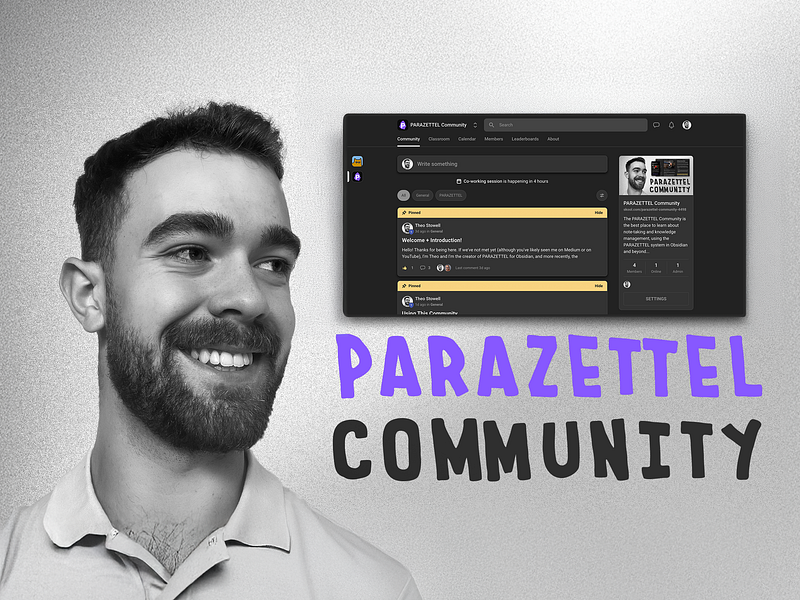
Recently I built a community, and the platform that I chose to run it was Skool. It’s backed by Alex Hormozi and Sam Ovens, two massive personal brands in the online business space and although it’s not fancy, it just works…
Note-Taking Templates: The Limitations of a Done-For-You Approach
Progressing beyond selling an Obsidian vault…
Since starting I’ve been talking to community members, and I’ve added a lot of content to the community classroom, including an entire course about Minimal Note-Taking.
If you want to be a part of the community, then you can go to the front page and learn more at parazettel.com/community.
This is one of the newest additions to the stack…
Seeing as I’ve been making plenty of video content on my YouTube channel and also for my community and products on the backend, I’ve been looking for an efficient way to go about editing everything.
This plugin for Adobe Premiere Pro/Davinci Resolve is the most effective that I’ve found so far.
It does a no-nonsense job of cutting silences from my videos, and whilst I still cut out the sections and make the order of the speaking in the way that I want, this is now much, much easier with this very cheap subscription.
There is a more advanced subscription which gives access to other things, like AI captions and auto-zoom, but I’m not prioritising video editing at the current early point in this journey of creating content on YouTube. Maybe I will in the future and will again look to Autocut to help provide this.
For a long time, I’ve used Google Workspace for my business accounts and admin, but it’s not built to be that useful. There are 100,000 features in the admin dashboard that I don’t need, and I’ve got one workspace for each domain that I own, and even at £6/workspace, this is still a lot of money.
So just last month, I switched to Proton. Now all of my domains and email addresses are in one dashboard and inbox, all the calendars are compiled into one, and I’ve got much more cloud storage, all whilst keeping things much more private.
And seeing as I’m the only person in my business (at the moment), it means that I’ve only got to shell out for one seat in their business suite plan. This makes it very affordable. I also get Proton Pass, which so far has been a suitable replacement for Bitwarden so far.
The software options I’ve given in this list are the most relevant and the ones that I’ve got the most to talk about with, but there are a couple of others that play a role in my business…
- Carrd — this is where I build all my landing pages and websites, and it’s fantastic. The tool’s got all of the features that I need to build something simple yet effective, all for a yearly price so cheap it feels as though it’s free.
- Listlockr — it’s said that your email list is the single most important asset in your business, so I pay a very small fee each month to have it backed up to a third party. This is another one of those peace-of-mind purchases that don’t cost much but take a great weight off my shoulders.
There’s a common theme to how I’m spending my money on the software for my business. You might have spotted it by now…
It’s to simplify and automate things. Whether this is the sending of emails, or the removing of silences in video editing, or buying Obsidian sync so that I don’t have to worry about notes across all my devices, I’ve just tried to stretch my money to get more and more leverage.
And I think that this has been so essential for the success of my business. There’s leverage in doing things that mean I don’t have to be in front of my computer all day, essential seeing as I’m juggling a degree at the moment and looking for other jobs, and trying to make everything move forwards smoothly.
Whilst it took a lot of effort and attention to get off the ground, the business now works even when I’m only prioritising getting the most important 10% of tasks done (which is often just making useful and informative articles like this one), and then getting on with other things.
And it’s been working.
— Theo